
ServeLume / The connected field service platform
One platform.The whole workday.
Connect the people who plan the work with the people who do it. Jobs, field records and the next step, together.
Explore your workflow · Review live plans · Bring your team
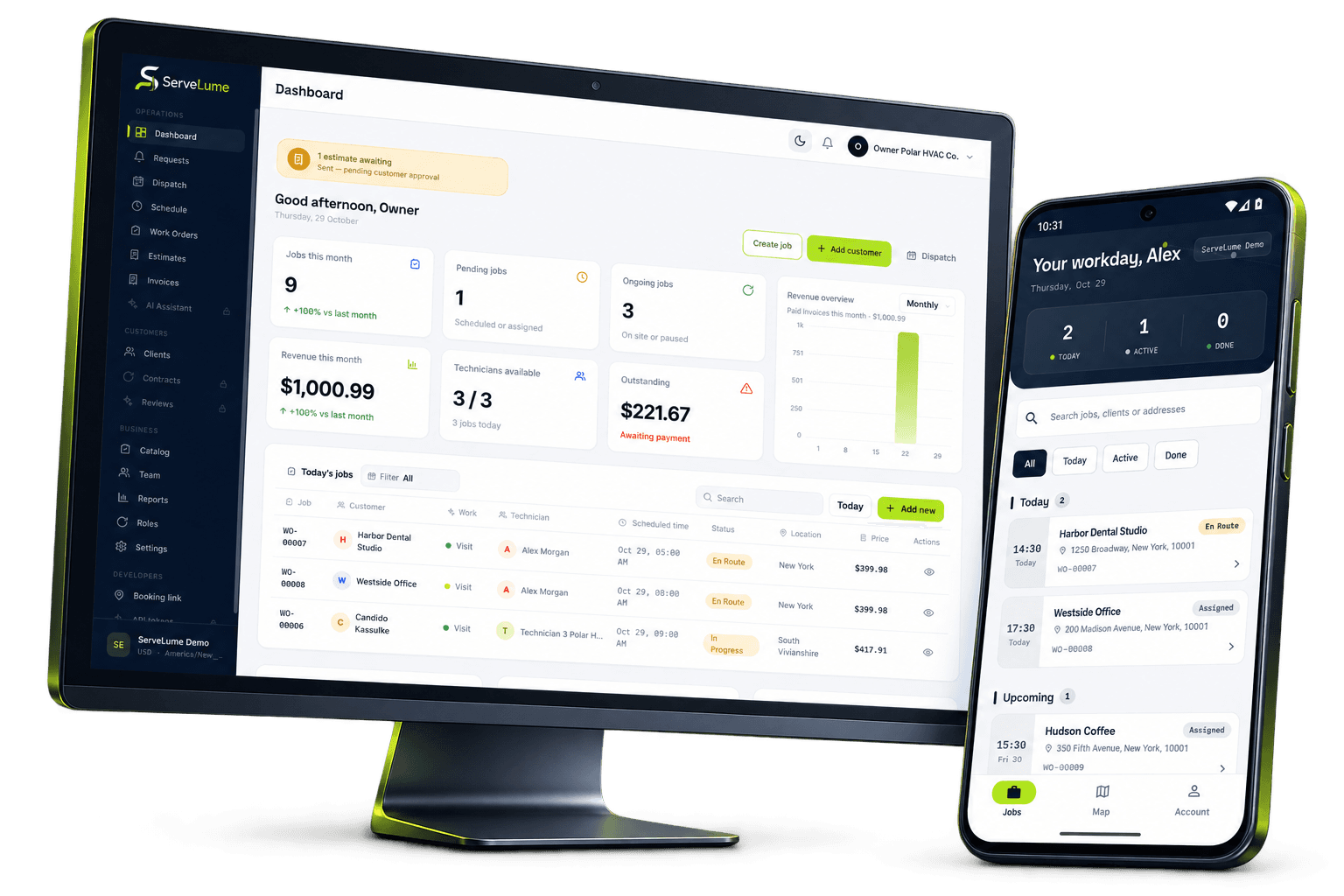
THE SERVELUME PLATFORM
The job is the thread. Keep everyone connected.
A customer request moves through many hands. Give every person a clear place to find the details, carry the work forward and leave a useful record.
EXPLORE THE PRODUCT
Different parts of the day.
A connected way to work.
Job management
From the first customer request to the final handover, keep the people, details and next steps together.
Explore jobs/02Scheduling & dispatch
Bring office planning and assigned field work into the same conversation, even when the day changes.
Explore scheduling/03Mobile field app
Put the right context in your technician's hands. Capture the work while the details are still fresh.
Explore field app/04Photos, checklists & signatures
Give the office more than a completion status. Keep useful evidence alongside the work it explains.
Explore proof of work/05Materials & equipment
Keep materials, equipment activity and return decisions connected to the work your team actually performs.
Explore materials/06Invoicing
A clear invoice starts with a clear job. Give your office the context to review work and prepare the next step.
Explore invoicing/07Payments
Connect invoice context with your payment process, with clear expectations about eligibility and status.
Explore payments/08API & developer access
A documented interface for the tools around your workspace. Clear contracts, private credentials and explicit access.
Explore api01 / Office + field
One job record. A whole team connected.
A customer call is the beginning of the job, not the whole brief. Keep the location, contact, reported issue and intended scope together so the person doing the work can prepare before reaching the door. Work order management software gives the office a practical place to preserve what was agreed.
Separate the customer's description from confirmed findings. Add access instructions and relevant background without burying the essentials in a long message thread. A colleague who did not take the original call should be able to understand why the visit exists and what needs attention.
- Keep the service location with the request
- Make the intended scope understandable
- Prepare a clearer handover to the field
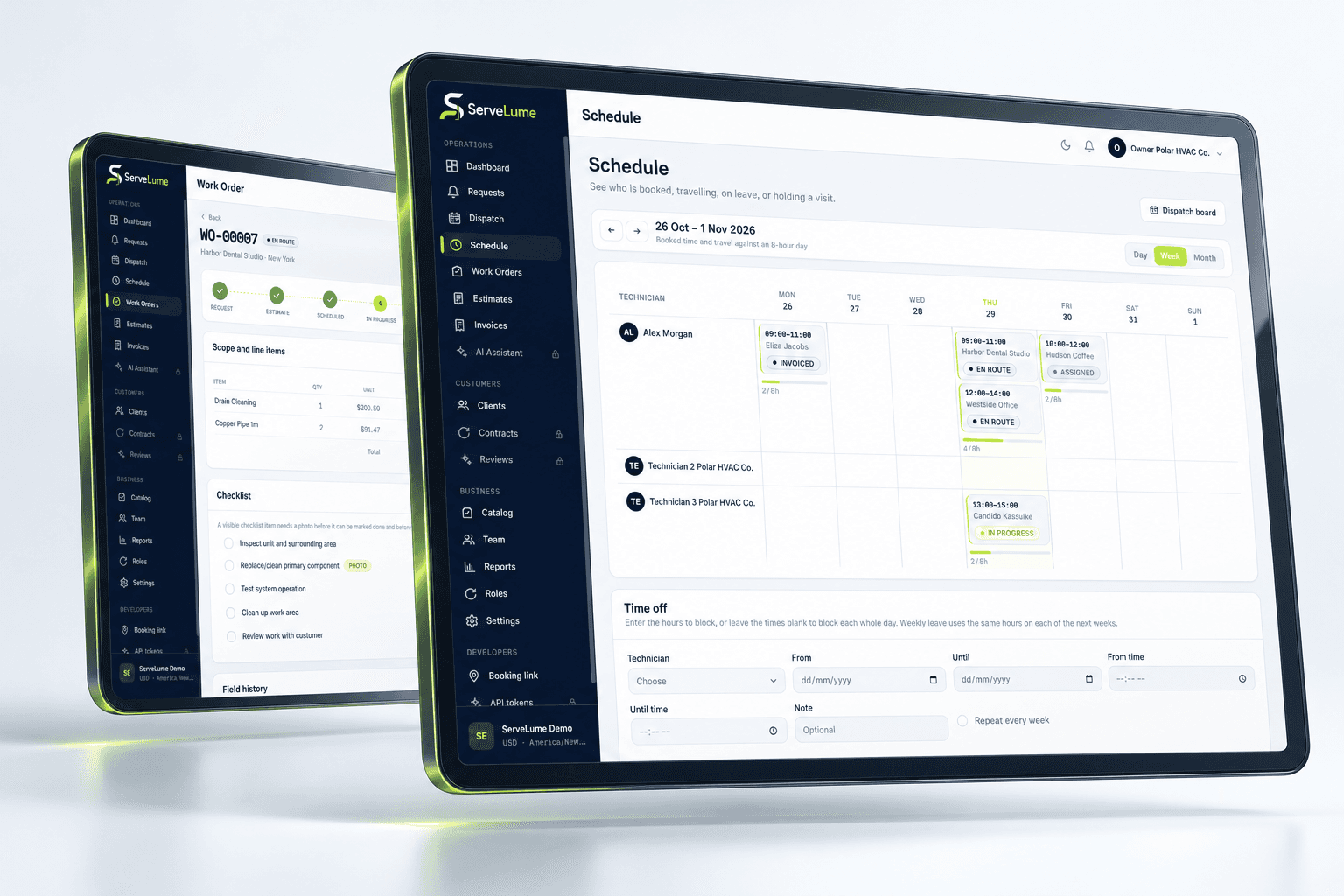
02 / Work where the work happens
Give the field a voice in the record.
Photos, checklist responses, notes and customer signatures can help explain what happened on site. Record relevant information against the visit while the context is fresh, instead of asking the office to reconstruct it from separate messages or a technician's camera roll.
Agree on a useful standard before adding more administration. A clear observation should distinguish the reported issue from the confirmed finding, and an attachment should show the relevant condition. A signature follows your own acceptance process; it does not independently certify compliance or replace qualified judgement.
- Keep work evidence with its visit
- Complete the configured job checklist
- Preserve relevant materials and service notes
03 / A clearer next step
Carry the context all the way through.
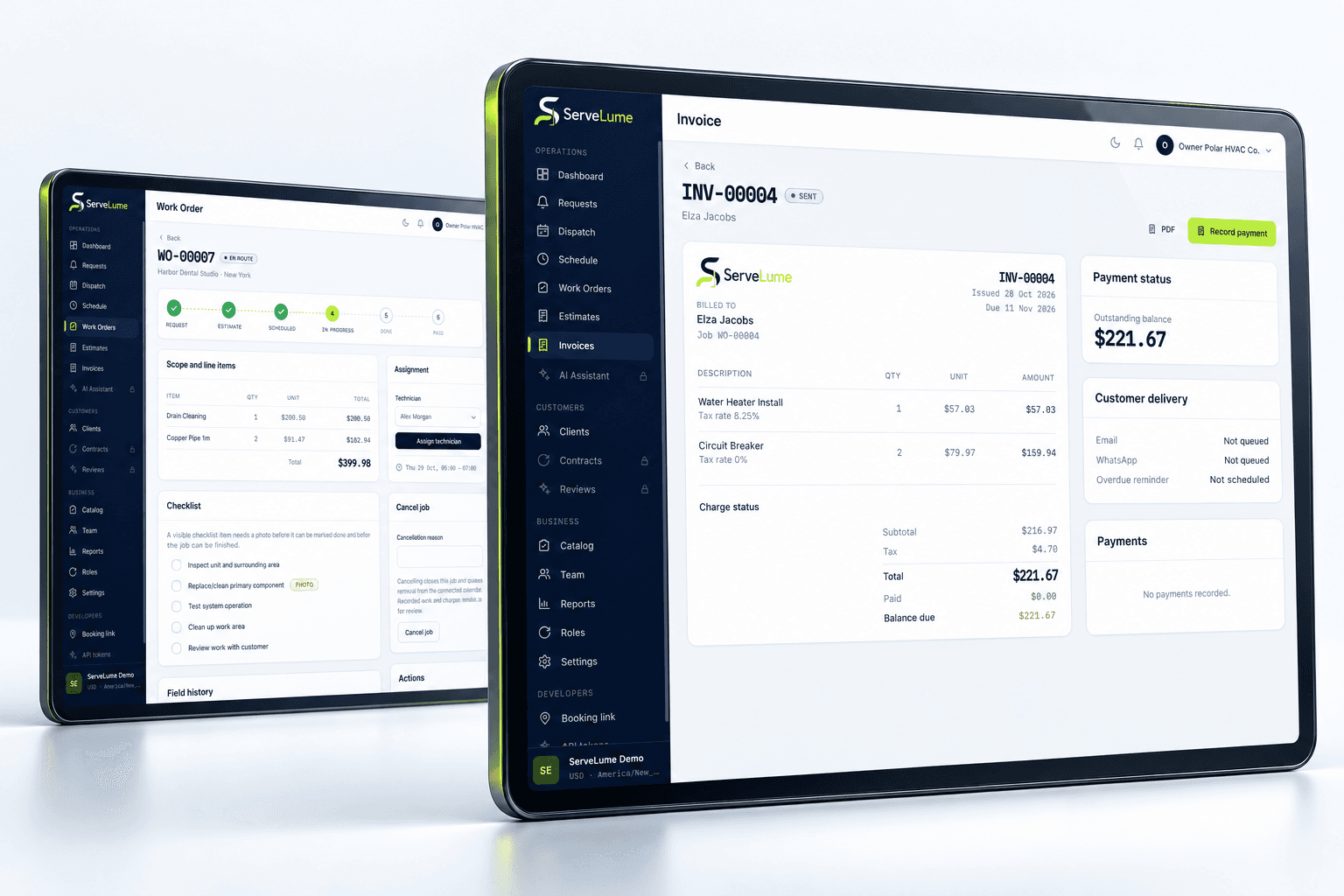
An understandable invoice starts with an understandable job. Review the original request, agreed scope and field result together before deciding what to bill. ServeLume connects job and invoicing workflows so the office has a clearer starting point for the commercial handover.
The attending technician and billing colleague may not share the same perspective. Notes should explain what was completed, what remains open and what needs approval. Keep recommendations distinct from completed work so a suggestion for a future visit is not accidentally treated as an authorised current charge.
- Review the original scope and result
- Keep field context available to the office
- Separate recommendations from completed work
A PRACTICAL WAY TO WORK
A clear path. From one person to the next.
Make the handover deliberate, at every stage of the service.
- 01
Start with the request
Capture customer and site context. Build a useful work order and organise the assigned visit before the field team arrives.
- 02
Keep the visit connected
Review the brief, capture relevant job evidence and record materials while the service context is fresh.
- 03
Give the next person clarity
Review the result, outstanding work and billing handover. Keep the office and customer clear about the next action.
BUILT TO BE EVALUATED BY YOUR TEAM
Built around your work. Evaluated by your team.
Start with a service visit your business knows well. Bring the office person who plans it and the field person who attends. Explore the whole handover, not only a feature list. Review the configured account, supported devices and current plans before deciding how ServeLume fits the way your team works.
Discuss your workflowGO DEEPER
A practical guide to the connected platform.
Explore the workflow and its boundaries in more detail. Each section stays connected to the product, not to an isolated document.
A service business depends on the information passed between people. The first caller knows the customer’s request, the dispatcher understands the schedule, the technician sees the site and the office prepares the commercial record. When those views become disconnected, a simple job can require several extra conversations. ServeLume brings work orders, assigned field jobs and proof of work into a shared workspace so the team can preserve a clearer account of what was agreed, what happened and what should happen next.
The platform is designed around service operations rather than a promise that every business follows the same process. Use the overview below to understand the workflow, then evaluate the actual product against representative jobs. Where your team needs a specialist tool, technical calculation or mandatory industry document, confirm the current capability rather than assuming it is included in a broad feature category.
/01Job management
+
A useful work order begins with an understandable request. Record the customer, location, relevant contact and intended scope, while distinguishing reported symptoms from confirmed findings. A booking title should help someone recognise the work, but the underlying description needs enough context for a colleague who did not receive the original call. Clear records reduce the need to reconstruct the request from separate messages.
The job remains the place to connect the practical sequence: initial scope, relevant changes, field evidence and the next action. An attendance can be completed while the wider job still needs customer approval or another visit. Preserve that distinction so the office does not mistake a finished appointment for a resolved issue. Your business decides what a complete record means for the services it performs.
/02Scheduling and dispatch
+
A schedule communicates the plan for attendance. It should also be supported by the information that makes the plan practical: the right contact, relevant access arrangements and any dependency that must be resolved before the work can proceed. A date in a calendar does not establish that materials are ready or that the customer has approved an expanded scope.
ServeLume helps the office organise jobs and share the relevant details with the field team. Your dispatcher remains responsible for realistic allocation, customer communication and assessing changes to the day. Do not infer a guarantee of route optimisation, emergency attendance or a particular productivity gain from the presence of a scheduling workflow. Test the actual process your team needs, including return visits and incomplete arrangements.
/03The field team app
+
ServeLume Field gives technicians a workflow for assigned jobs and job-linked records. The attending person should be able to identify the work, review the relevant brief and preserve the result without relying on an informal conversation that the office cannot later find. A concise note explaining the observed condition can be more useful than a large quantity of unexplained text or images.
Use the mobile evaluation to check the device, account and workflow your team intends to use. A real Android demonstration screen appears in the marketing preview with sample data; it is not a claim that every app store listing or device feature is available. Confirm store availability, supported versions and any essential integration before planning an operational rollout.
/04Checklists, photographs and customer sign-off
+
Evidence is most useful when it explains the actual work. A checklist can prompt a consistent review, while notes describe exceptions and limitations. A photograph should identify the relevant condition or result without unnecessarily capturing residents, private documents or unrelated possessions. Customer sign-off can support a handover where appropriate, but should relate to the service and acknowledgement your business has agreed.
These records do not independently establish professional compliance. A completed checklist, photo or signature is not a substitute for qualified judgement, licensing, safety procedures or a mandatory certificate. ServeLume helps organise the record. Your business and appropriately qualified people remain responsible for deciding what work is appropriate and which technical documentation the service requires.
/05Materials and equipment service activity
+
Material records should explain their relationship to the task. Distinguish items used or installed from those proposed, reserved, brought to site or returned. The person reviewing the job should not have to guess whether an entry belongs to a customer charge, an internal cost or a future recommendation. Clear descriptions and quantities are more useful than unexplained abbreviations.
ServeLume includes recorded-material, equipment-related service and part-return workflows. Evaluate these with your own examples and identification practices. A general equipment record should not be assumed to provide every specialist field, calculation, warranty integration or statutory form used in a particular industry. Confirm the actual product boundary before making it part of a critical process.
/06Invoicing and payment handover
+
The office needs an understandable account of the job before deciding what to bill. Review the original scope, authorised changes, completion notes and relevant material records. A field observation should not silently become a new price or an additional charge without the customer approval process your business requires. Recommendations for further work should remain distinct from completed work.
ServeLume connects job and billing workflows, while your business controls prices, tax settings and payment terms. Payment options depend on the configured provider, merchant account, country and supported device. A product feature does not guarantee eligibility for a payment service or that a particular method is available on every phone. Test the actual collection process with the intended configuration before relying on it in the field.
/07Access, verification and responsible information handling
+
New self-service owners provide a mobile number with country code and verify their email before verifying the phone. WhatsApp OTP delivery uses Meta’s Cloud API, while SMS uses Twilio. Sending and checking codes is restricted, and fallback messages count against shared limits. These controls support account security and cost protection; they do not replace broader business security practices or the provider setup required for production delivery.
Customers should select appropriate users, protect devices and keep passwords and other secrets out of job notes. Record only personal information needed for legitimate service purposes. Review the available roles and actual access behaviour during the trial. Public marketing content and the authenticated product have different responsibilities, and public article access should not expose customer workspace information.
/08API documentation and development
+
The developer site publishes a server-rendered API reference generated from the Laravel OpenAPI contract. It describes the documented interface rather than claiming every internal mobile route is a permanent public integration. Authentication, tenant permissions, validation and applicable plan gates remain responsibilities of the backend. Tokens should be kept secure and limited to the access needed for an integration.
Developers should handle authentication failures, permission errors, validation responses and rate limits explicitly. Do not retry non-idempotent writes blindly. Evaluate integrations with appropriate data before they affect live customer records. The developer program page provides a starting point for an integration discussion; it is not a promise of automatic programme admission or an undocumented support commitment.
/09Evaluate a complete workday in your trial
+
Choose a straightforward job and a more complex case involving a change or follow-up. Follow each from the request through scheduling, field records and office review. Ask an office colleague to reconstruct the outcome without a separate conversation. If the record is unclear, identify whether the issue is a missing team habit, an unclear description or a capability that needs to be discussed with ServeLume.
The backend confirms current active plans, currency, billing period and the fourteen-day trial policy. Use the pricing page for the current information rather than relying on a price repeated in an old article. Businesses in Australia, the UK and the US should review the workflow against their own commercial, licensing and documentation requirements. The goal is a more coherent service process, supported by software that your team has actually evaluated.
A FEW USEFUL ANSWERS
Clarity before you commit.
Understand the workflow, the requirements and the boundaries.
01What connects the ServeLume platform?
The job record connects office planning, assigned field work and the next handover. Explore the dedicated product pages for the details of each workflow and evaluate them with your own sample jobs.
02Where can I review current plans and trial details?
The pricing page reads active plans, currency, billing periods and trial information from the product backend. Registration confirms eligibility and commercial terms before you continue.
03Is every device or payment method supported?
No universal availability is implied. Device functionality, store distribution and payment methods depend on the actual platform, provider and account configuration. Confirm the exact workflow you intend to use.
04Can we use it for our industry?
Explore the industry guides for workflow context, then evaluate the product against your actual service. Mandatory trade documents, professional judgement and specialist systems remain requirements to confirm, not capabilities to assume.
YOUR NEXT CONNECTED WORKDAY
Bring the whole job
into the picture.
Start with a real workflow question. Explore the product with the people who plan the work and the people who do it.